Imperago ยท Feature showcase

Rota Management.

Imperago Scheduling is a huge time saver. Plan your schedule or roster by any factor you wish, such as location, department, skill, job, contract, production line, time or equipment, and see the cost of the roster in real time as you build it.

Guarantee you have the right people, on the right job, in the right place, at the right time and with the right equipment.
Why Imperago for rostering

Roster by any factor, cost it as you go

Most rostering tools let you put a name against a shift. Imperago Rota Manager lets you plan against what the business actually needs on the day, tells you what the plan costs while you build it, and checks your rules as you edit rather than after you have finished.

Roster by anythingLocation, department, skill, job, contract, production line, time, equipment. The list is endless.
Real-time costThe cost of the roster, and the effect of every change, shown as you plan.
Checked as you editRules are verified in real time and the manager is alerted there and then.
Staff arrange coverAvailability, broadcasts and automated shift cover through Self Service and the app.
Key features

Eight things the Rota Management module does

1
Fixed rosters and ad hoc changesSet patterns for the routine, then move a person to another job role or time as you wish.
2
Real-time budget and cost forecastsSee what the roster costs and how any change would affect the budget before you save it.
3
Staff availability in Self ServiceStaff publish when they can work; managers needing cover see it in real time.
4
Broadcast shifts needing coverSend uncovered shifts to staff through Self Service, email or SMS.
5
Advanced filtersView by location, job role, production line, person, department or roster pattern.
6
Automated Shift CoverStaff make their own roster changes; requests that keep the rules are authorised automatically.
7
Real-time roster auto-checkSkill levels, staff numbers and hours checked while editing, not afterwards.
8
Publish when readyDraft privately, then publish rosters to staff by date range, filter or individual.
In the product

How it looks day to day

Click any screenshot to enlarge it.

1

Easy rostering by location, department, skill, job, contract, production line, time or equipment

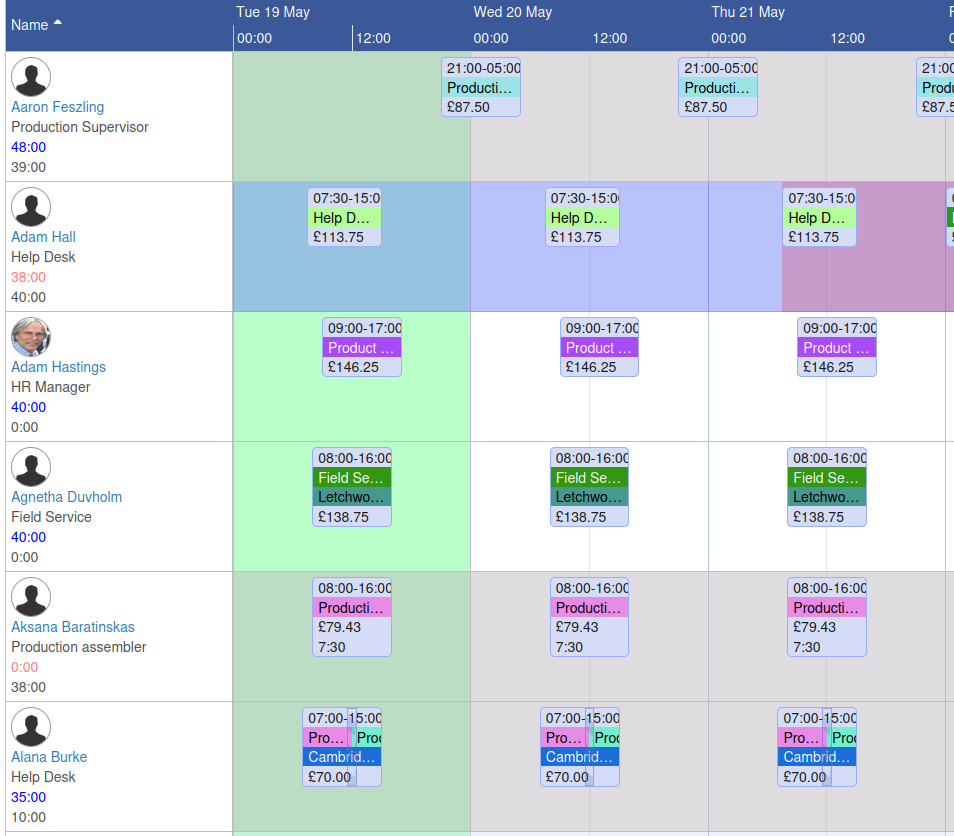
Requirements describe what a day needs: two field service engineers in Letchworth, one on the main production line with the right skill, office admin cover from nine to three. Roster against the requirement and Imperago shows how close you are to meeting it.

As well as fixed rosters, managers can change shifts around as they wish, for example moving a person to another job role at another time, without breaking the pattern for everyone else.

  • Location
  • Department
  • Skill
  • Job role
  • Contract
  • Production line
  • Equipment
Requirements defined by location, skill, production line or job, with today's status in the footer.
Roster cost against budget for a cost centre, filtered to those over budget.
2

Make informed decisions

Imperago Rota Manager shows you real-time budget information and cost forecasts, and how any change you make to the staff schedule would affect them. Every shift on the Planning screen carries its cost, so moving a shift, swapping a person or adding an hour is priced before you save it.

The Costs vs Budget report then shows each cost centre against its budget for any date range, and can be filtered to just the ones under or over.

3

Rapidly manage and fill gaps in the roster

The requirements footer shows how many of each requirement are filled on each day. Click a cell and you see exactly which requirement is short and by how many.

  • Staff publish their availability in Self Service, which managers needing cover can view in real time.
  • Managers broadcast shifts that need cover to staff through Self Service, email or SMS, and take the first suitable reply.
4 of 16 places filled today; the pop-up shows which requirements are short.
A week at a glance, filtered by group, with rest days and break rules on each shift.
4

Manage, schedule and view rosters using advanced filters

View the roster by location, job role, or location and job role together, by production line, person or department. Filter to the employees on a particular roster pattern, save the filter as a profile, and switch between simple, detailed, month calendar and year calendar views of the same plan.

  • Location
  • Job role
  • Production line
  • Person
  • Department
  • On roster pattern
  • Month and year calendar
5

Staff make their own roster changes with Automated Shift Cover

Staff see their roster in Self Service and the Imperago On-the-Go app, and can request changes themselves: pick up an open shift, swap with a colleague, or swap with a colleague's rest day where you allow it.

Requests are automatically authorised if they do not break the fixed requirements of the roster, such as skill level or staff numbers. Only the requests that would break a rule need a manager's attention.

The week's shifts in the mobile app, with open shifts and requests a tap away.
Hours against contract flagged in colour as you plan; costs on every shift.
6

Real-time roster auto-check

Rules are verified in real time as the roster is edited, alerting the manager at the time. Other systems make you validate the roster afterwards, and fix a plan you thought was finished.

Requirement status colours show red under target, green on target and blue over the maximum. Maximum period lengths stop a shift running past your limits, and a change warning can be switched on for anyone about to edit or delete a roster entry.

7

Draft privately, publish when the schedule is ready

Managers publish and unpublish rosters directly, so schedules reach employees only when they are ready to be shared. Pick a date range, then publish for everyone in the current filter or choose individuals.

On the Planning screen, published ranges highlight blue and unpublished grey, and a Published Rosters list shows what is out. In Self Service and the app, unpublished ranges are clearly marked and stay hidden from open shift requests and colleague schedule views until you publish them.

Publish a week for everyone in the filter, or hand-pick who sees it.

Auto Rostering: rosters that build themselves New in 6.2.6

Auto Rostering builds employee schedules automatically from your rules, then hands the draft to the manager to finish. It is configured to suit your organisation's requirements and constraints.

  • Faster schedule creation
  • Fewer manual errors
  • Better compliance with working time rules
  • Available to Time and Attendance customers; ask the sales team
Frequently asked questions

The questions we get asked first

Is it a cloud system?

Yes, it is a 100% cloud system.

Is it hosted in the UK?

Yes, Imperago is hosted in the UK. See ISO 27001 & data security for how we look after your data.

Is HFX on G-Cloud?

Yes, HFX is listed on G-Cloud 15. We have been on G-Cloud for many years, since we have many public sector customers and it is often a requirement.

What is workforce management software?

Workforce management software helps an organisation plan, track and manage its people: who is needed, who is available, who is at work, what they are owed and what it costs. Imperago covers rostering, time and attendance, absence, flexitime, self service and reporting in one cloud system.

Part of Imperago

Works with the rest of the suite

Bring us next week's rota

The best test of a rostering system is your own requirements: your sites, your skills, your budgets. Book a demo and we will plan a week against them in front of you, costs and all.

Call 0330 122 7200 or email salesteam@advt-group.com. Existing customers: the 6.2.6 release notes cover roster publishing and Auto Rostering, or email support@hfx.co.uk.