Imperago ยท Feature showcase

Forecasting and Budgeting.

A powerful tool which enables you to view in real time the cost of different staffing patterns and changes to the rotas. Run a scenario, see what it costs, and know whether you are within budget before the period starts rather than after it ends.

Enhance financial control with HFX's advanced forecasting and budgeting solutions.
Why Imperago for budgeting

Know what the plan costs before you commit to it

Most organisations find out what a period cost when payroll runs. Imperago prices the roster as you build it, compares it with the budget you set for each cost centre, and puts the answer on the home screen, so a manager can see the effect of a change while there is still time to make a different one.

Scenario costs in real timeSee the cost of the different staffing patterns and roster changes you run, as you run them.
Within budget at a glanceEach cost centre shown over or under budget, by month, on the dashboard.
Budget by any dimensionCosted budget data by client, job, agency, cost centre, production line and more.
Before the period, not afterForecast shift results from the roster and your rules, ahead of the actuals.
Key features

Eight things the Forecasting and Budgeting module does

1
Cost every shift as you planThe Planning screen shows the cost of each shift, so a change is priced before it is saved.
2
Run scenariosTry a different pattern, a different person or an extra hour and see the cost move in real time.
3
Budgets per cost centreSet a target for each cost centre and period, in money, units or time.
4
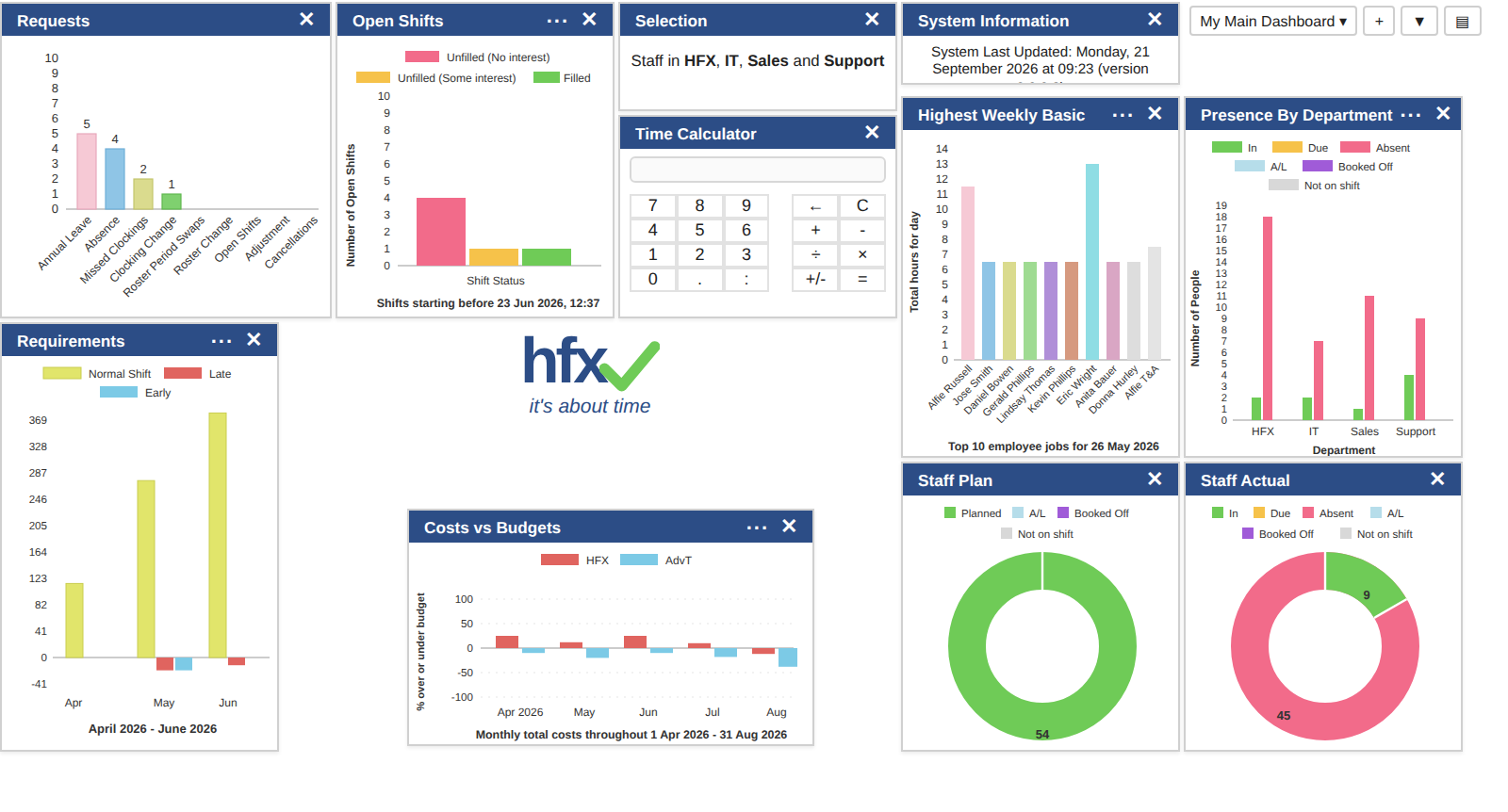
Costs vs Budgets dashboardA home screen panel shows each cost centre's percentage over or under budget, month by month.
5
Roster Costs vs Budgets reportRostered spend against target for chosen cost centres and dates, filtered to under or over budget.
6
Predicted Actuals reportThe forecast shift result for a period, worked out from the roster and your rules.
7
Any dimension you budget byClient, job, agency, cost centre, production line: review the costed data the way finance thinks about it.
8
Staffing against demandRequirements charts show where shifts are over or under what the business needs.
In the product

How it looks day to day

Click any screenshot to enlarge it.

1

See costs in real time of the different scenarios you run

Every shift on the Planning screen carries its cost, worked out from the person's contract and the rules for that shift. Move a shift, give it to someone else, add an hour or swap a pattern and the cost updates as you do it, so a manager can compare two ways of covering the week and pick the cheaper one that still meets the requirement.

  • Cost per shift
  • Hours against contract
  • Contract rules applied
  • Compare scenarios
The cost of every shift, live, next to hours against contract.
Each cost centre over or under budget, month by month, on the home screen.
2

See at a glance if you are within budget

The Costs vs Budgets panel on the Imperago home screen plots monthly total costs as a percentage over or under budget for the cost centres you choose, or for all of them if you choose none. Bars above the line are over, bars below are under, and the picture updates as the roster changes.

Dashboards are personal: add the panel to your own layout, filter it to the cost centres you manage and save it as a named dashboard to switch between.

3

Provides real-time cost information

View in real time the financial impact of changes to the roster, and review the costed budget data: budget by client, job, agency, cost centre, production line and so on.

The Roster Costs vs Budgets report shows rostered spend against the configured target for the cost centres and dates you pick, with budget categories for money, units and time, and can be filtered to just the cost centres that are under or over budget with the percentage against budget alongside.

  • Client
  • Job
  • Agency
  • Cost centre
  • Production line
  • Money, unit or time
Cost, budget and percentage against budget for a cost centre and period.
Staffing against demand, by month, alongside the cost picture.
4

Forecast the period, not just cost it

Cost is half the forecast. The Requirements panel and the requirements footer on the roster show whether the plan meets what the business needs on each day, so you can see an under-staffed week and an over-budget week side by side and fix the one that matters.

The Predicted Actuals report takes it further: it works out the forecast shift result for a chosen period from the roster and your contract rules, giving you the hours and shift results you can expect before the actuals arrive.

The reports behind the numbers

Forecasting and Budgeting draws on Imperago's standard reporting, so every figure can be scheduled, saved as a report definition and exported.

  • Roster Costs vs Budgets: rostered spend versus configured target for chosen cost centres and dates.
  • Predicted Actuals: forecast shift result across a chosen period using the roster and rules.
  • Actuals (Detail and Totals by Attribute): what actually happened, to compare with the forecast.
  • Open Shifts and Roster Cover: where unfilled cover was transferred between employees over the period.
Frequently asked questions

The questions we get asked first

Is it a cloud system?

Yes, it is a 100% cloud system.

Is your data hosted in the UK?

Yes, Imperago is hosted in the UK. See ISO 27001 & data security for how we look after your data.

Is HFX on G-Cloud?

Yes, HFX is listed on G-Cloud 15. We have been on G-Cloud for many years, since we have many public sector customers and it is often a requirement.

What is a workforce management system?

Workforce management software covers the operational planning, deployment and management of staff. It sits between the HR system and payroll, and deals with the operational requirements of the business rather than the administrative ones: who is needed, who is working, what they are owed and what it costs. It typically includes time and attendance, rostering and flexitime, and in Imperago the Forecasting and Budgeting module adds the cost view across all three.

Part of Imperago

Works with the rest of the suite

Bring us a budget and a roster

The quickest way to see Forecasting and Budgeting work is with your own cost centres and next month's plan. Book a demo and we will set the budgets, load the roster and show you where it lands.

Call 0330 122 7200 or email salesteam@advt-group.com. Existing customers: the Time & Attendance guide covers the dashboard panels and the Costs vs Budgets and Predicted Actuals reports, or email support@hfx.co.uk.