


Imperago ยท Feature showcase

Employee Self Service.

A huge time saving for HR and payroll teams, faster payroll preparation, and proven to increase employee satisfaction. Staff see their hours, balances, holidays and schedules 24/7 from any device, and sort most things out themselves.

Holiday requests, schedules and shifts, availability, balances, outstanding exceptions, messaging and notifications, all in one place for every employee.
Why it matters

Fewer questions for HR, faster answers for staff

Routine questions about hours, holidays and rotas stop landing in the HR inbox, because employees can see the answer and act on it themselves.

24/7, any deviceWorking hours, holidays, absences and schedules in real time, from any location.
Fewer emails and callsA significant reduction in the volume reaching HR and payroll.
Little to no trainingEasy to use and intuitive, and fast to roll out.
Staffing checked automaticallyRequests are checked against cover and demand before they reach a manager.
What employees can do

Six things staff stop asking HR about

Click any screenshot to enlarge it.

1

Holiday management and holiday requests

Employees request holiday or absence from the New Request form, check the balance before they submit, and follow the request through requested, accepted or declined without chasing anyone.

Requests can be made outside working hours without waiting for the HR office to open, because the system automatically checks whether the request would leave the department short staffed or unable to meet work demand.

  • Annual leave
  • Absence and adjustments
  • Full day, AM, PM or hours
  • Check balance first
The request form, with a Check Balance button beside Save.
Published shifts and booked absence in one colour-coded month.
2

View work schedules and shifts

The calendar shows the published rota alongside booked leave, working from home and training, by month or by year. Any change a manager makes is there the next time the employee looks, so nobody turns up for a shift that moved.

A single day opens into the full picture: schedule, adjustments, requests, clockings, balance, exceptions and availability.

3

Manage your schedule: shift changes and availability

Staff can see their colleagues' schedule for the week, publish their own availability for overtime or extra shifts, and raise a request against a day straight from the calendar.

Managers get availability they can actually use when a gap appears, rather than ringing round.

The team's week, so cover and swaps are visible before they are asked for.
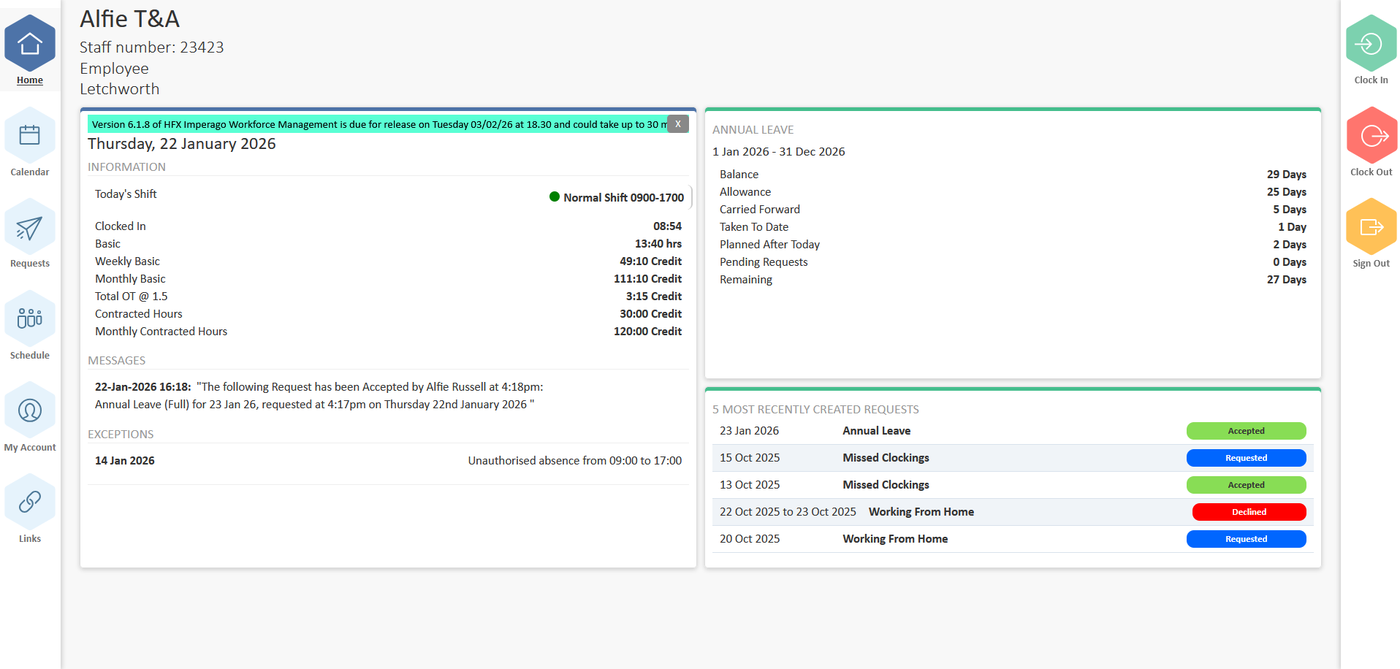
Balances, annual leave and recent requests on the home page.
4

Consult balances: hours worked, overtime, holiday taken and pending

The home page shows today's shift and clockings, basic and overtime balances for the week and month, contracted hours, and the annual leave position: allowance, carried forward, taken, planned, pending and remaining.

Employees see the same figures payroll will use, so queries arrive before the pay run rather than after it.

5

Manage outstanding exceptions

A missed clocking or an unexpected arrival time shows as an exception on the employee's own day view. They raise the correction themselves, with the times and a comment, and the manager only has to approve it.

Staff resolve absence-related exceptions online through Self Service, which is where much of the HR time saving comes from.

One day, with the exception and the request that fixes it side by side.
Every request and its status, with a message when a decision is made.
6

Messaging and notifications

When a manager accepts or declines a request the employee is told in Self Service and by notification, with the decision recorded against the request. Messages from managers appear on the home page, so the information flow works in both directions.

Two sides of the same screen

Why both HR and employees like it

HR and payroll managers

A huge time saving and faster payroll preparation

It requires little to no training and is fast to roll out. It significantly reduces the volume of emails and calls to the HR and payroll department, and enables staff to resolve exceptions relating to absence online through Self Service.

Employees can access their own information on time worked, absence, holiday, hour balances and published schedules, and manage schedule changes themselves.

Employees

Easy, intuitive and available whenever they need it

Staff can obtain information about their working hours, holidays, absences and schedules 24/7, from any location, in real time, without bothering the HR department.

They can book holiday or absence outside of working hours without waiting for HR to be back in the office, because the system auto-checks whether the request would leave the department short staffed or unable to meet work demand.
Frequently asked questions

The questions we get asked first

Is it a cloud system?

Yes, it is a 100% cloud system.

Is your data hosted in the UK?

Yes it is. See ISO 27001 & data security for how it is protected.

What is a workforce management system?

Workforce management (often shortened to WFM) addresses a specific need within an organisation: the operational planning, deployment and management of staff.

WFM generally sits between HR and payroll solutions, with integration to each. Whilst HR and payroll are generally admin solutions, WFM focuses on the operational needs of the organisation.

A WFM system typically includes core modules of attendance recording (time and attendance), rota management (rostering) and flexitime.

Part of Imperago

Works with the rest of the suite

Give your staff the answers before they ask

Self Service is the quickest module to roll out and the one employees notice first. Book a demo, or if you already run Imperago, ask support what it takes to switch it on.

Call 0330 122 7200 or email salesteam@advt-group.com. Existing customers: the Employee Self Service guide covers sign-in, requests, the calendar and clocking, or email support@hfx.co.uk.