Pick the credential for the site, not the other way round
A terminal is only as good as the clockings it produces. The right device for a clean office is the wrong one for a food factory, and a reader that struggles with wet hands or gloves creates exceptions for managers every single day. HFX supplies a short range of terminals that between them cover every common credential, so you can match the device to the environment and still manage everyone in one place.
Five ways to clock
Each credential has a job it is best at. Most sites end up with two, so that a forgotten card or a cut finger does not stop someone clocking.
The five terminals
From the reception desk to the loading bay. Capacities are the base specification; most can be increased at order.
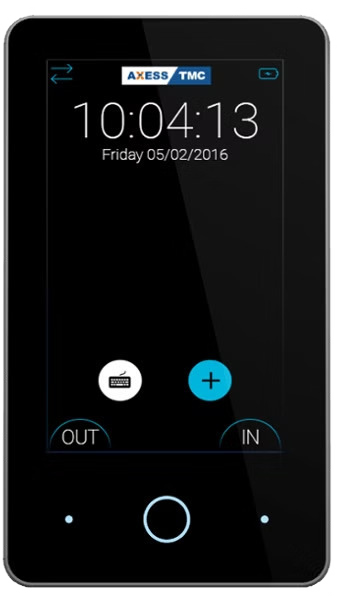
HFX Glass
Touchscreen card and PIN terminal.
A slim glass touchscreen that looks at home in a reception or an open-plan office. Staff tap a card or fob, or type a PIN, and press IN or OUT. It is powered over its network cable, so installation is a single Cat5e or Cat6 run, and a backup battery keeps it running through a power cut. It arrives pre-configured, so in most cases you only need to mount it and plug it in.
- Card and fob
- NFC
- PIN
- Fingerprint via external reader
- Power over Ethernet
- Backup battery
- Screen
- 4.3-inch colour touchscreen, portrait or landscape
- Cards
- 125 kHz EM and 13.56 MHz MIFARE including DESFire; NFC tags
- Network
- Ethernet with PoE on one cable; HTTPS
- Biometrics
- Optional external fingerprint readers (up to 8)
- Power cut
- Internal battery keeps it running
- Mounting
- Wall bracket, vertical or horizontal
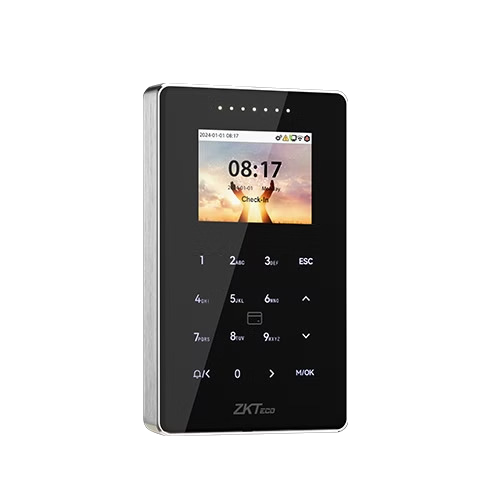
HFX 800
Rugged card and PIN terminal for outdoor and harsh sites.
The badge terminal for the yard, the gatehouse and the factory door. A metal mid-frame and tempered glass panel give it IP65 water and dust protection and an IK04 impact rating, and it works from minus 10 to 55 degrees. The hidden touch keypad takes a six-digit PIN when a card is not to hand. It also carries the access control interfaces, so the same unit can clock people in and open the door.
- Card and fob
- PIN
- IP65 and IK04
- Outdoor rated
- Door control
- AES-256
- Screen
- 2.4-inch colour display with hidden touch keypad
- Cards
- 125 kHz and 13.56 MHz; MIFARE, DESFire, HID Prox and iCLASS with the multi-tech module
- Capacity
- 50,000 cards, 200,000 clockings (expandable)
- Network
- Ethernet 10/100; optional Wi-Fi; Wiegand, RS485, OSDP
- Environment
- IP65, IK04, -10 °C to 55 °C
- Access control
- Lock, door sensor and exit button interfaces; anti-passback
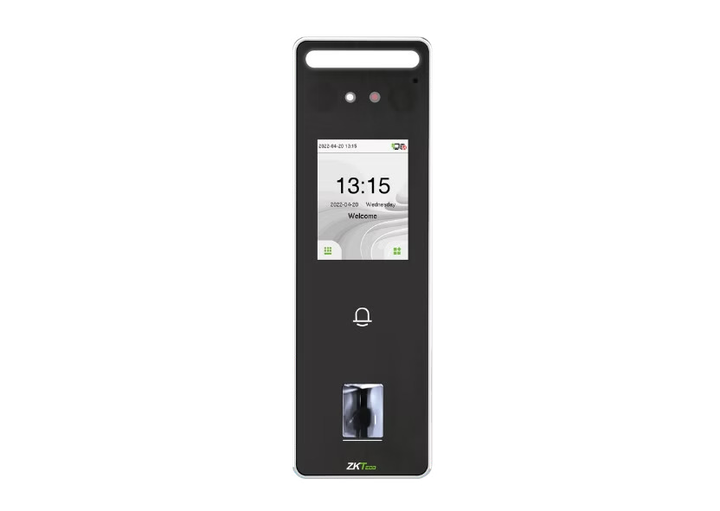
HFX V3
Slimline fingerprint and card terminal.
A lot of terminal for its size. Fingerprint verification in under a third of a second, a card reader and a touchscreen PIN, in a unit 20 mm deep that fits a single gang box. IP65 rated, so it is happy on a covered external wall as well as inside, and it carries door control interfaces for a combined clocking and access point.
- Fingerprint
- Card and fob
- PIN
- IP65
- Door control
- Screen
- 2.4-inch touchscreen
- Recognition
- Fingerprint under 0.3 s
- Capacity
- 3,000 fingerprints, 3,000 cards, 200,000 clockings (expandable)
- Network
- Ethernet; optional Wi-Fi; Wiegand, RS485
- Environment
- IP65, -5 °C to 45 °C
- Size
- 185 × 58.5 × 20 mm, single gang box
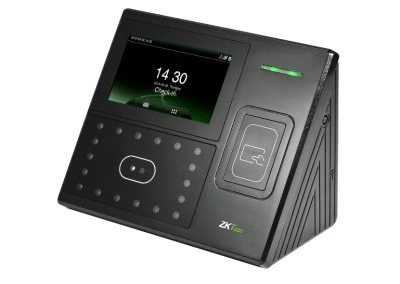
HFX 401
Face and card terminal.
The established face terminal with a larger 4.3-inch touchscreen, so staff can see their name and the result clearly. It holds 3,000 faces, checks that a face is live rather than a photo, and can take an optional battery that keeps it clocking for around four hours in a power cut. A good fit for a busy staff entrance where throughput matters.
- Face
- Card and fob
- PIN
- Optional battery
- Screen
- 4.3-inch touchscreen
- Recognition
- Face with live-face detection
- Capacity
- 3,000 faces, 10,000 cards, 100,000 clockings
- Network
- Ethernet; optional Wi-Fi; USB host for data export
- Environment
- Indoor, 0 °C to 45 °C
- Power cut
- Optional 2,000 mAh battery, around 4 hours
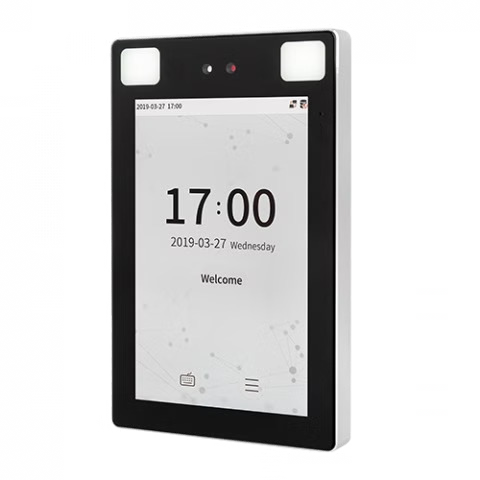
HFX XP
Contactless face and palm terminal.
Nothing to touch when clocking. The XP verifies by face or palm in under a tenth of a second, works in direct sunlight and near-darkness, and is rated IP68 and from minus 30 to 60 degrees, so it is the choice for food production, healthcare and any site where hygiene or gloves rule out fingerprints. An 8-inch screen and a wide-angle camera handle a queue at shift change, and the optional card modules cover MIFARE, DESFire and HID.
- Face
- Palm
- PIN
- Card and fob (optional)
- IP68
- Sunlight to low light
- Door control
- Screen
- 8-inch IPS touchscreen
- Recognition
- Face under 0.09 s; works up to 50,000 lux; live-face detection and anti-spoofing
- Capacity
- 30,000 faces, 5,000 palms, 1,000,000 clockings (expandable)
- Network
- Ethernet; optional Wi-Fi on 2.4 and 5 GHz; Wiegand, RS485
- Environment
- IP68, IK04, -30 °C to 60 °C
- Size
- 227 × 143 × 26 mm
Which terminal does what
| Feature | HFX Glass | HFX 800 | HFX V3 | HFX 401 | HFX XP |
|---|---|---|---|---|---|
| Card or fob | Module | ||||
| PIN | |||||
| Fingerprint | External | – | – | – | |
| Face | – | – | – | ||
| Palm | – | – | – | – | |
| Screen | 4.3-inch touch | 2.4-inch, touch keypad | 2.4-inch touch | 4.3-inch touch | 8-inch touch |
| Outdoor rating | Indoor | IP65, IK04 | IP65 | Indoor | IP68, IK04 |
| Operating temperature | Indoor | -10 °C to 55 °C | -5 °C to 45 °C | 0 °C to 45 °C | -30 °C to 60 °C |
| Network | Ethernet with PoE | Ethernet, Wi-Fi optional | Ethernet, Wi-Fi optional | Ethernet, Wi-Fi optional | Ethernet, Wi-Fi optional |
| Power cut | Built-in battery | – | – | Optional battery, c. 4 h | – |
| Door control interfaces | Gate control | – | |||
| Base capacity | Small to large sitesmanaged from a browser | 50,000 cards200,000 clockings | 3,000 prints, 3,000 cards200,000 clockings | 3,000 faces, 10,000 cards100,000 clockings | 30,000 faces, 5,000 palms1,000,000 clockings |
| Hub guide | Glass guide | 800 guide | V3 guide | 401 guide | XP guide |
Start from the environment
Biometric data, installation and support
Biometric terminals store a mathematical template, not an image of the finger, face or palm, and the template cannot be turned back into one. Our biometric template security guide explains how templates are created, stored and deleted, and is written to share with employees and data protection officers.
- On-site or self install. HFX engineers can install, or follow the self-install guide for the 800, V3, 401 and XP.
- Set up with you. The Glass arrives pre-configured; for the others the guides walk through the cloud server, Ethernet, Wi-Fi and firewall settings step by step.
- One set of credentials. The same card or template serves clocking, access control and the fire roll call.
- Supported by HFX. Firmware, replacements and troubleshooting through support@hfx.co.uk.
The questions we get asked first
Can staff use more than one credential on the same terminal?
Yes. Each person can have a card, a PIN and a biometric enrolled, and the terminal offers whichever they present. Most sites run a biometric with a card or PIN as the fallback, so a plaster on a finger or a forgotten badge does not stop a clocking. On the HFX Glass, tell support which combination you want (card and PIN, card, PIN and fingerprint, or PIN and fingerprint) because the set-up differs slightly.
What happens if the network goes down?
Terminals store clockings locally and push them to Imperago when the connection returns, so nothing is lost. The HFX Glass has a built-in battery and the HFX 401 can take an optional one, so they also keep clocking through a power cut. Each guide has a status icon reference showing whether the terminal is connected to the network and the cloud.
Do we need a server on site?
No. Terminals talk directly to the Imperago cloud over HTTPS on your existing Ethernet or Wi-Fi. The only requirement is an outbound rule on your firewall, which the guides list.
Is face recognition GDPR compliant?
Biometric data is special category data under UK GDPR, so you need a lawful basis, a privacy notice and usually an impact assessment. The terminals help by storing only an encrypted template rather than an image, and by letting you delete a single credential without deleting the person. See the biometric template security guide and ISO 27001 & data security. This is a summary rather than legal advice; your DPO should confirm the position for your organisation.
Can the same terminal open the door?
The HFX 800, V3 and XP carry lock, door sensor and exit button interfaces, and the HFX Glass can act as a gate controller, so one unit can clock people in and control the door. See the access control set-up guide.
Which cards and fobs work?
125 kHz proximity (EM) and 13.56 MHz MIFARE, including DESFire, across the range. The HFX 800 and HFX XP can be ordered with multi-technology modules that add HID Prox, HID iCLASS, FeliCa and Legic, which is useful if you already have a card estate from another supplier. Tell us what you have and we will match the reader.
Works with the rest of the suite
Tell us about the site
Where the terminal will go, what the environment is like, how many people clock at once and what cards you already have. We will recommend the terminal and credential mix, and quote supply, installation and support.
Call 0330 122 7200 or email salesteam@advt-group.com. Existing customers: the terminal guides above cover installation, users, network and troubleshooting, or email support@hfx.co.uk.